Is TG Macro Safe?
TG Macro is a Windows tool that records and repeats keyboard and mouse actions. But when people ask, Is TG Macro safe?, they usually mean two things: is the downloaded file safe for the PC, and can using it cause a Roblox ban?
These are two separate risks. A program may be safe to install but still break a game’s rules when used for unfair automation.
Is TG Macro Safe to Download?
TG Macro lets users record actions, assign them to a key, and replay or loop them later.
Use the download button on this page to get the file. This helps you avoid random copies that may have been changed or bundled with unrelated installers. We have also included a VirusTotal screenshot for the file provided here. If you need an earlier build, see our TG Macro old version downloads.
Download TG Macro v3.051 · 0.91 MB · FreeIs TG Macro a Virus?
TG Macro is presented as an automation program, not malware. However, it records and simulates keyboard or mouse input. Some antivirus tools may see this behaviour as unusual and flag the file.
This can be a false positive, where a harmless file is detected by mistake. A small number of warnings does not automatically prove that a file is a virus. VirusTotal collects results from different security vendors and does not create its own final verdict.
TG Macro Virus Scan Results
The screenshot below shows how several antivirus engines responded to the TG Macro file on this page. The score at the top tells you how many scanners flagged it. The remaining scanners may show that no threat was detected.
If only a few scanners report a warning while most return a clean result, those detections may be false positives. The screenshot should also show the file name, scan date, and file hash. These details help readers identify the exact file that was tested.
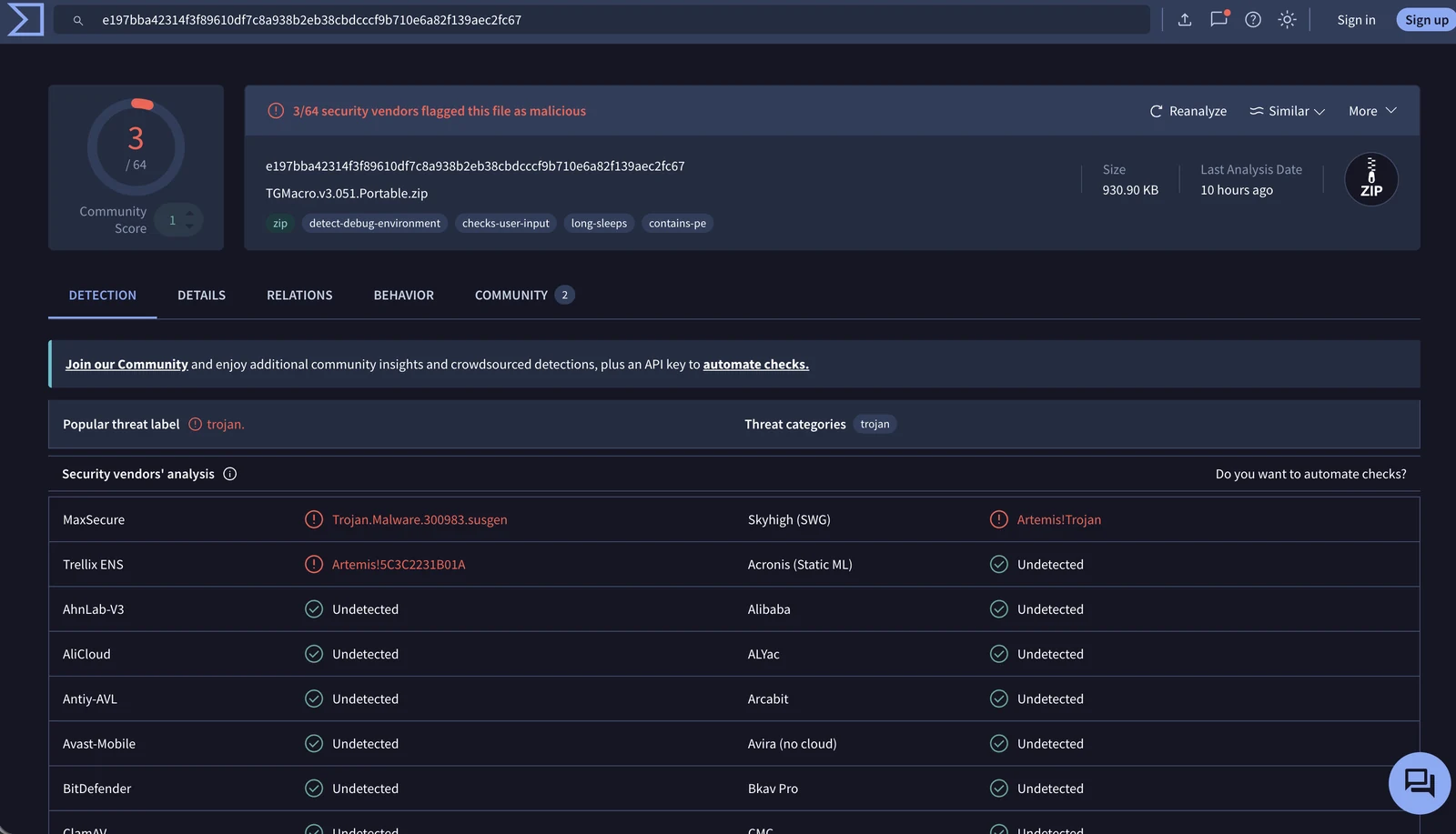
VirusTotal collects scan results from many independent security vendors. It does not make its own final decision about whether a file is safe. False positives can happen, so a small number of warnings may come from overly sensitive detection methods.
Why Does TG Macro Trigger Antivirus Warnings?
The VirusTotal scan for TGMacro.v3.051.Portable.zip shows that 3 of 64 security vendors flagged the file, while the other 61 returned no detection.
The three warnings use broad Trojan or suspicious-file labels rather than naming one clearly identified malware family. This may indicate a heuristic detection. Heuristic systems flag files based on suspicious-looking behaviour or technical patterns, even when they do not match a known virus exactly.
TG Macro performs actions that some security tools may treat cautiously:
- It reads keyboard and mouse input. TG Macro needs input hooks to record keys, clicks, and mouse movement.
- It sends automated input. The program simulates key presses and clicks when a macro runs.
- It pauses and checks for input. Waiting between actions and monitoring user input are normal macro functions, but they may look unusual during automated analysis.
- The portable build runs without a normal installation. Standalone applications may receive more attention from reputation-based scanners, especially when the exact file has limited download history.
- The file may be unsigned. When a program has no trusted digital signature, Windows and reputation-based security systems have less publisher information to use.
These behaviours do not prove that TG Macro is malicious. VirusTotal itself explains that harmless files can sometimes be detected by one or more scanners, and its report combines results from independent antivirus companies rather than giving a final safety verdict.
TG Macro’s earlier release notes also state that merging libraries and compressing resources once caused false antivirus alerts. Those packaging methods were later changed. However, this does not prove that every warning on the current version is a false positive.
The scan result should therefore be described as mostly undetected, but not completely clean. Readers can compare the file name and SHA-256 hash shown in the screenshot with the file offered on this page.
VirusTotal result: 3 security vendors flagged the file, while 61 returned undetected.
If an antivirus blocks the file, do not automatically assume the warning is correct or incorrect. Confirm that the file hash matches the one displayed on this page and review the latest scan before deciding whether to run it. Microsoft confirms that unsigned files start with no established SmartScreen publisher reputation, which can contribute to warnings.
Is TG Macro Legit?
Yes, TG Macro is a real Windows macro application. It can record keyboard and mouse events, save macros, assign shortcuts, and repeat actions.
Still, a real program is not automatically allowed in every game. Using it for a personal shortcut is different from using it to farm rewards or automate gameplay while away from the computer.
Is TG Macro a Hack or Cheat in Roblox?
TG Macro is not the same as a Roblox exploit or injector. It normally sends keyboard and mouse input instead of changing the Roblox client.
However, this does not mean every macro is allowed. A simple shortcut and a macro that automatically farms rewards or performs impossible actions are not the same. Roblox treats cheating and exploiting as rule violations, and individual experience developers may also ban players for unfair automation. For an example of an in-game setup, see our TG Macro Da Hood guide or the TG Macro for Fortnite guide.
Can TG Macro Get You Banned in Roblox?
Using TG Macro does not guarantee a ban, but it is not guaranteed to be allowed either. Roblox experience creators can ban players from their own games. These bans are separate from platform-wide Roblox bans, so the user may still access other experiences.
The risk is higher when a macro gives an unfair advantage or performs actions faster and more consistently than a person normally could.
For example, a macro that repeatedly farms items or completes difficult actions without normal player input may break the rules of that experience. Always check the game’s rules before using automation.
Does Roblox Detect Macros?
Roblox does not publicly say that it detects TG Macro by name. However, Roblox advises developers to use server-side checks for suspicious or impossible behaviour.
A game may check action speed, repeated timing, movement, or requests sent to the server. A developer may therefore notice the results of automation without directly identifying the program running on the PC.
Detection methods differ between experiences, so nobody can honestly promise that a macro is undetectable.
How to Use TG Macro More Safely?
- Download only from the trusted source just like our website.
- Create or load a small macro and assign a trigger key.
- Test it before using it during normal gameplay.
- Read the rules of the Roblox experience.
- Avoid unattended farming and unfair competitive actions.
- Stop using macros when a game clearly prohibits automation.
Final Verdict
So, is TG Macro safe? TG Macro is a keyboard and mouse automation tool and is not automatically a virus or Roblox hack. Some antivirus warnings can be false positives, and the VirusTotal screenshot gives useful context.
The Roblox ban risk depends on how the macro is used. Automation that provides an unfair advantage or breaks a game’s rules can lead to action from the experience creator.
Frequently Asked Questions
Is TG Macro Safe for Windows?
It is a Windows automation tool. Use the download on this page and review the VirusTotal scan provided with it.
Is TG Macro a Virus?
TG Macro is not presented as a virus. Some security engines may flag its automation behaviour, and these warnings can be false positives.
Is TG Macro Bannable in Roblox?
It may lead to a ban when it breaks the rules of an experience or gives the player an unfair advantage.
Does Roblox Detect TG Macro?
Roblox does not publicly confirm detection of TG Macro by name. Developers can still detect suspicious automated behaviour.
Can I Use TG Macro in Every Roblox Game?
No. Each experience may have different rules, so check them before using a macro.